
Organic Traffic with Pinterest
Great Ways to Get More Organic Traffic with Pinterest
- Why Pinterest is a Goldmine for Organic Traffic
- Way 1 — Optimise Your Pinterest Profile for SEO
- Way 2 — Create Scroll-Stopping Pin Designs
- Way 3 — Master Pinterest SEO and Keywords
- Way 4 — Build and Optimise Your Boards Strategically
- Way 5 — Pin Consistently with a Smart Schedule
- Way 6 — Use Rich Pins to Stand Out
- Way 7 — Leverage Idea Pins and Video Pins
- Way 8 — Join and Contribute to Group Boards
- Way 9 — Analyse Pinterest Analytics and Optimise
- Way 10 — Link Pinterest to Your Blog and Email List
- Pinterest Traffic Audit Checklist
- External Resources
- Frequently Asked Questions
00 Why Pinterest is a Goldmine for Organic Traffic
Most people think of Pinterest as a social media platform — but it is actually a visual search engine. When someone types "easy dinner recipes" or "home office decor ideas" into Pinterest's search bar, they are actively looking for content to click on and explore. This is completely different from scrolling Instagram, where content is pushed at users passively.
The result: Pinterest users arrive at your website with genuine intent. They were searching for exactly what you offer. Pinterest traffic consistently converts at higher rates than social media traffic, and because pins have a much longer lifespan than social media posts, one excellent pin can continue driving visitors for 2-3 years after it was first published.
Instagram post: 48-hour lifespan. Reaches followers only. Zero click-through on most posts. • TikTok video: 24-72 hour viral window. Hard to drive off-platform traffic. • Pinterest pin: 3-6 month peak, then continues forever. Every pin is a clickable link. Search-driven discovery — reaches people who never heard of you. Pinterest wins for sustained organic traffic by a massive margin.

Your Pinterest profile is the foundation of everything. Pinterest treats your profile name, bio, and board titles as SEO signals — just like Google treats a webpage's title and meta description. A properly optimised profile appears in Pinterest search results, Google search results, and attracts the right audience who actually wants your content. Most accounts waste this prime real estate with vague names and empty bios.
- Display Name: Include your primary keyword — e.g., "Sarah | Food Blogger & Easy Recipes", not just "Sarah Smith"
- Username: Match your brand name — keep it consistent with other platforms for cross-platform SEO
- Bio (160 chars): State who you help, what you share, and include 2-3 keywords naturally — "Helping busy parents find quick dinner recipes, meal prep ideas, and family-friendly meals."
- Profile Photo: Use a clear, recognisable face or logo — consistency builds brand recognition
- Claimed Website: Claim your website in Pinterest settings — this unlocks analytics and Rich Pin eligibility
- Business Account: Convert to a free Pinterest Business account to unlock analytics, Rich Pins, and ads features
Pin design is the single most important factor in whether your content gets clicked or scrolled past. Pinterest is a visual platform — beautiful, clear, and purposeful pin design directly determines your traffic. The good news: you do not need to be a professional designer. Canva is free, has hundreds of Pinterest templates, and produces professional results in under 15 minutes.
The Anatomy of a High-Converting Pin
Create 3-5 different pin designs for every piece of content. Use different images, colours, title text, and layouts. Pin them at different times over 2-4 weeks. Pinterest's algorithm will promote whichever version performs best — giving your content multiple chances to go viral without publishing new articles.
Pinterest is a search engine powered by keywords. When users search for content, Pinterest matches their query against keywords in your pin title, pin description, board title, board description, and profile bio. Getting your keywords right means your pins appear in search results for months and years — organic discovery that costs nothing but strategy.
- Pin Title: Put the main keyword first — Pinterest truncates titles after 100 chars
- Pin Description: Write 150-300 words naturally, including 3-5 related keywords
- Board Title: Use searchable phrases — "Quick Dinner Recipes" not "My Food Boards."
- Board Description: 200+ words, keyword-rich description of what the board covers
- Alt Text: Describe the image with keywords for accessibility and SEO
- Use Pinterest search bar — autocomplete shows top searches
- Check the coloured keyword bubbles under search results
- Use Pinterest Trends tool — free, shows seasonal demand
- Look at competitor pins' descriptions for keyword ideas
- Use Google Keyword Planner for volume research
❌ Bad: "My Chocolate Cake Recipe" — too vague, no search intent
✓ Good: "Easy Moist Chocolate Cake Recipe — Ready in 45 Minutes" — specific, matches real searches, highlights value. Always write titles for what people search for, not just what you want to say.

Pinterest boards are how your account is organised — and they are a major ranking factor in Pinterest's search algorithm. A well-structured board with a keyword-rich title, detailed description, and consistent high-quality pins signals authority to Pinterest and helps your entire account rank better for related searches. Most creators have vague, poorly organised boards that actively hurt their discoverability.
- Create boards around specific keyword themes your audience searches — one topic per board, never mix unrelated content
- Write board descriptions of 150-200 words using natural keyword language — Pinterest indexes every word
- Use a keyword as the first word in every board title — "Healthy Meal Prep Ideas" not "Meal Prep & Health."
- Add a cover pin to every board — the first impression matters for profile visitors
- Keep boards to 20+ pins minimum before promoting them — Pinterest boosts well-populated boards
- Create a "Best Of [YourBrand]" board — pin only your top content here and promote it heavily
- Delete or archive boards with fewer than 10 pins and no clear theme — they dilute your account authority

Pinterest's algorithm heavily favours accounts that pin consistently over time rather than accounts that pin in bursts. An account that pins 5-10 times every day grows significantly faster than one that pins 100 times one week and nothing the next. Consistency signals to Pinterest that you are an active, reliable creator — and they reward that with wider distribution of your content.
- Pin 5-10 times daily — spread throughout the day
- Best times: 8-11pm (your audience's local time)
- Use Tailwind or Pinterest's built-in scheduler
- Pin the same content to multiple relevant boards
- Space repins of the same content 2+ weeks apart
- 40% your own original pins and blog posts
- 30% repins from top creators in your niche
- 20% evergreen reference content (guides, tutorials)
- 10% seasonal and trending content
- Avoid pinning all your content at once
Tailwind (tailwindapp.com) is the most popular Pinterest scheduling tool — it pins at your optimal times automatically, suggests the best boards for each pin, and provides powerful analytics. Their free plan pins up to 20 pins/month. Pinterest's own built-in scheduler is also free and works well for basic scheduling.

Rich Pins are a free Pinterest feature that automatically syncs metadata from your website to your pins. When you enable Rich Pins, your article pins show the live article title, author, and description directly from your webpage — displayed in bold below the pin image. This makes your pins look significantly more professional and authoritative than standard pins, and they consistently achieve higher click-through rates.
- Article Pins: Show headline, author, and story description — perfect for blogs
- Product Pins: Show price, availability, and product info — essential for e-commerce
- Recipe Pins: Show ingredients, cook time, and servings — ideal for food bloggers
- Add Open Graph or Schema.org tags to your website
- Verify at Pinterest Rich Pin Validator tool
- Submit to Pinterest and approval takes 24-48 hrs
- All future pins from your site will be Rich Pins automatically

Pinterest introduced Idea Pins (formerly Story Pins) and video pins as formats it actively promotes with significantly higher organic reach than standard static pins. Pinterest's algorithm in 2026 heavily favours video content — accounts that incorporate videos and Idea Pins into their strategy consistently report 2-5x more impressions than those posting only static image pins.
- Create step-by-step tutorials (recipes, DIY, how-tos)
- Add text overlays to every slide — many users watch without sound
- Keep each Idea Pin to 5-10 slides maximum
- Include a strong hook on slide 1 — the preview card
- Use trending audio to boost algorithm distribution
- 6-15 seconds performs best for product and tip videos
- Vertical 2:3 ratio — matches Pinterest's native format
- Start with your most compelling moment — no slow intros
- Add captions — Pinterest auto-generates these for you
- Pin the same video to multiple relevant boards
Idea Pins currently do not support outbound links — they cannot drive direct website traffic. However, they are extremely effective for growing your follower count and brand awareness, which ultimately drives more traffic to your standard link pins. Use Idea Pins to grow your audience, and standard pins to drive traffic to your site.

Group boards are shared Pinterest boards where multiple contributors can add pins — meaning your content reaches the followers of every contributor in the group. A group board with 50,000 followers means every pin you add gets exposure to 50,000 people, regardless of how many followers your own account has. This is one of the most powerful ways for new Pinterest accounts to generate immediate organic reach without waiting months to build their own audience.
- Search your niche keyword on Pinterest and filter results to "Boards" — group boards show a multiple-person icon
- Look at successful accounts in your niche and check which group boards they contribute to
- Use PinGroupie.com — a free directory of thousands of Pinterest group boards organised by category
- Follow the board's owner and send them a polite DM requesting to join — introduce yourself and share your profile link
- Only join boards that are active and relevant to your niche — inactive or off-topic group boards have no value
- Once accepted, add 3-5 of your best pins to the board — never spam with low-quality content as you can be removed
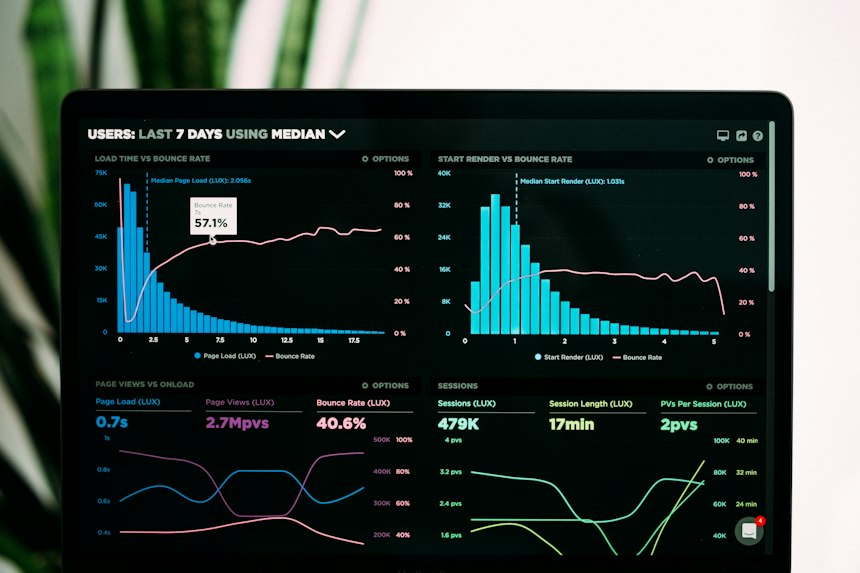
Pinterest provides a free and surprisingly powerful analytics dashboard for business accounts. Most creators ignore it — which is a massive missed opportunity. Pinterest Analytics tells you precisely which pins are driving clicks, which boards perform best, what your audience is most interested in, and which days generate the most traffic. Using this data to guide your content strategy doubles and triples your traffic growth rate compared to guessing.
| Metric: What | t It Tells You: Action | n If Low |
|---|---|---|
| Impressions | How many times have your pins appeared in feeds/search | Improve keywords & post more consistently |
| Saves (Repins) | How many people saved your pin — strong quality signal | Improve pin design and content value |
| Link Clicks | How many people clicked through to your website | Most important — improve CTA and pin title |
| Click Rate | % of people who clicked after seeing your pin | Better titles, clearer value proposition |
| Top Boards | Which boards drive the most traffic to your site | Create more content for top-performing boards |
| Audience Interests | What topics does your audience save and engage with | Create content aligned with these interests |
Every month, identify your top 5 pins by link clicks. Create 3-5 new pin designs for each of those articles — different images, titles, and colour schemes. You already know the content works. You are just multiplying its reach with fresh creative. This single habit can double your Pinterest traffic without publishing a single new article.

Getting a visitor from Pinterest to your blog is only the first step. The real goal is to convert that visitor into an email subscriber — so you can reach them again and again, regardless of what Pinterest's algorithm does. Pinterest traffic is powerful, but it can fluctuate. An email list that you own is the asset that makes Pinterest traffic permanent and compounding.
- Ensure every blog post has a "Pin It" button prominently placed
- Create a dedicated Pinterest-worthy image for every post
- Add internal links to keep visitors exploring your site
- Make sure landing pages load in under 2 seconds on mobile
- Match the promise in your pin title exactly to your content
- Offer a free lead magnet (checklist, template, guide)
- Add an email opt-in within the first 300 words of each post
- Use exit-intent popups to capture leaving visitors
- Create content upgrades (bonus content related to each post)
- Welcome email sequence nurtures new subscribers immediately
Pinterest sends traffic → visitors save your pins (increasing your reach further) → they subscribe to your email list → you email them new content → they visit and save more pins → Pinterest algorithm sees engagement and promotes your pins more widely → more traffic arrives. This virtuous cycle makes Pinterest traffic compound over time — each visitor you capture makes the next 100 visitors more likely.
11 Pinterest Traffic Audit Checklist
Use this checklist monthly to ensure your Pinterest strategy is firing on all cylinders:
- ✅Business Account: Converted to Pinterest Business account — analytics and Rich Pins enabled
- ✅Profile: Display name includes primary keyword, bio is 160 chars with 3+ keywords
- ✅Website Claimed: Website verified in Pinterest settings for Rich Pin eligibility
- ☐Rich Pins: Article/Product Rich Pins enabled and showing bold metadata below pins
- ☐Boards: All boards have keyword-rich titles and 150+ word descriptions
- ☐Pin Designs: All pins are 1000×1500px vertical with bold title text and brand colours
- ☐Pinning Schedule: Pinning 5-10 times daily on a consistent schedule (using scheduler)
- ☐Keywords: Every pin title and description includes 3-5 researched keywords
- ☐Analytics: Reviewing top pins monthly and creating new designs for top performers
- ☐Group Boards: Contributing to at least 3-5 relevant, active group boards
- ☐Video/Idea Pins: Publishing at least 2 videos or Idea Pins per week
- ☐Email Capture: Blog has an opt-in form and a lead magnet to convert Pinterest visitors to subscribers
12 Trusted Pinterest Resources
13 Frequently Asked Questions
Pinterest is not a social media platform you check for likes — it is a search engine you build assets on. Every pin you create with the right keywords, dimensions, and strategy is an asset that can drive organic traffic to your website for years. The bloggers and business owners generating 50,000-500,000 monthly visitors from Pinterest are not doing anything magical — they are following the consistent, patient strategy outlined in this guide.
Start today: convert to a Pinterest Business account, optimise your profile bio with keywords, create three vertical pin designs for your most popular blog post, and pin them to your best boards over the next week. Track your clicks in Pinterest Analytics after 30 days.
Pinterest traffic compounds. The best time to start was 6 months ago. The second-best time is right now.


0 Comments